
A help section for parents with students at Chilwell School
ICT Help Hub
Parents evening booking
Chilwell School uses Parent Booking for, both on site and remote.
You will be sent a magic link to logon and an invitation to make your appointments.
Google Classroom summaries for parents
The schools preferred tool for supporting online learning is Google Classroom.
It is possible to get weekly or daily summaries for your child across all their google classes. While only the school can invite a parent or carer to link with a pupils account, the parent must accept the invitation which will come in the form of an email. The following information is a quick guide to the process as well as other information you may find helpful.
The school will add your email to your child’s account.
This triggers an email to you. Invitations to receive Google Classroom summaries will come from no-reply@classroom.google.com
If you have not received an invite please check your junk mail folder or search from mail from the above email address. An invitation will look like the screen shot below.
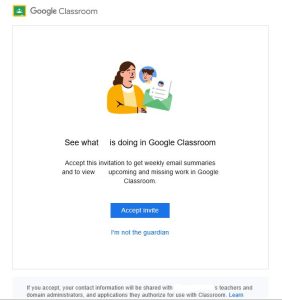
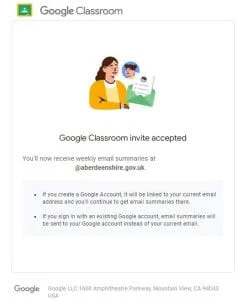
Clicking on Accept will automatically start the flow of guardian summaries to the email address listed. It will also take you to a further page where you have the option of adding or linking a Google Account.
If you do not wish to add or link a google account simply close the window.
You can keep track of your student’s Google Classroom progress through Guardian Email Summaries. You can choose the frequency of the emails – daily or weekly – and you can unsubscribe or remove yourself from Classroom at any time.
Guardian Email Summaries include:
- Missing Work – Work that’s late at the time the email was sent
- Upcoming Work – Work that’s due today and tomorrow (for daily emails) or work that’s due in the upcoming week (for weekly emails)
- Class Activity – Announcements, assignments, and questions recently posted by teachers
Once we have invited a guardian there is very limited further troubleshooting we can do other than to remove the link and resend the invite. If you clicked, “I’m not the guardian” or deleted the link and wish it re-established please contact the school.
Occasional, shared computers may become ‘confused’ as to which Google account you are trying to access/link. As part of our remote troubleshooting we may direct you to use this link to log you out of all google accounts on your device.
https://accounts.google.com/Logout?
Other Useful Links
There are a number of resources which you may find helpful in connection with our use of guardian summaries.
Link to check the status of any linked pupils
If the email you use is also linked with a gmail account, this will also show you which email is linked the summaries and allow you to change the frequency of the summaries.
https://classroom.google.com/u/0/gs
General information for Guardians
https://support.google.com/edu/classroom/answer/6388136?hl=en-GB&authuser=0
Specific Information for Guardians
https://support.google.com/edu/classroom/answer/6388136
Arbor MIS
Our school MIS is Arbor, and as a parent you have access to both our Parent Portal and Parent App.
The Parent Portal allows you to access Arbor on a laptop or computer, the Parent App is the mobile version of our Parent Portal.
If you do not have your logon detail, these can be requested from the School Office.
Further help can be found here: